- English
- 简体中文
- Esperanto
- Afrikaans
- Català
- שפה עברית
- Cymraeg
- Galego
- 繁体中文
- Latviešu
- icelandic
- ייִדיש
- беларускі
- Hrvatski
- Kreyòl ayisyen
- Shqiptar
- Malti
- lugha ya Kiswahili
- አማርኛ
- Bosanski
- Frysk
- ភាសាខ្មែរ
- ქართული
- ગુજરાતી
- Hausa
- Кыргыз тили
- ಕನ್ನಡ
- Corsa
- Kurdî
- മലയാളം
- Maori
- Монгол хэл
- Hmong
- IsiXhosa
- Zulu
- Punjabi
- پښتو
- Chichewa
- Samoa
- Sesotho
- සිංහල
- Gàidhlig
- Cebuano
- Somali
- Тоҷикӣ
- O'zbek
- Hawaiian
- سنڌي
- Shinra
- Հայերեն
- Igbo
- Sundanese
- Lëtzebuergesch
- Malagasy
- Yoruba
- Español
- Português
- русский
- Français
- 日本語
- Deutsch
- tiếng Việt
- Italiano
- Nederlands
- ภาษาไทย
- Polski
- 한국어
- Svenska
- magyar
- Malay
- বাংলা ভাষার
- Dansk
- Suomi
- हिन्दी
- Pilipino
- Türkçe
- Gaeilge
- العربية
- Indonesia
- Norsk
- تمل
- český
- ελληνικά
- український
- Javanese
- فارسی
- தமிழ்
- తెలుగు
- नेपाली
- Burmese
- български
- ລາວ
- Latine
- Қазақша
- Euskal
- Azərbaycan
- Slovenský jazyk
- Македонски
- Lietuvos
- Eesti Keel
- Română
- Slovenski
- मराठी
- Srpski језик


How Aluminum Laptop Stand Addresses Everyday Laptop Ergonomic Challenges?
Article Summary
Extended laptop use has become a daily norm for professionals, students, and remote teams. However, prolonged screen time often leads to neck strain, poor posture, overheating devices, and inefficient desk organization. An Aluminum Laptop Stand is designed to respond directly to these challenges by elevating devices, improving airflow, and enhancing workspace efficiency. This article explains how aluminum laptop stands solve common user pain points, what practical benefits they offer, and how to select the right model for long-term comfort and productivity.
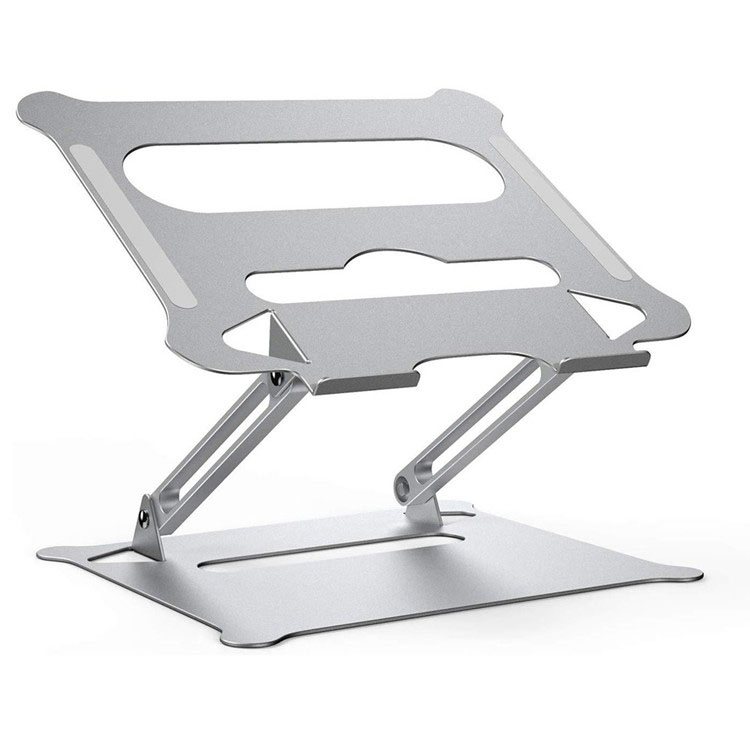
Table of Contents
- Understanding Common Laptop Usage Problems
- Why Aluminum Is the Preferred Material
- How an Aluminum Laptop Stand Improves Ergonomics
- Impact on Device Performance and Heat Management
- Workspace Organization and Visual Efficiency
- Key Features to Consider Before Purchase
- Use Scenarios Across Different Professions
- Comparison Table: Laptop Stand Types
- Frequently Asked Questions
- Conclusion and Next Steps
Understanding Common Laptop Usage Problems
Modern laptops are designed for portability, not prolonged desk use. When placed directly on a flat surface, screens often sit below eye level, forcing users to bend their necks forward. Over time, this posture contributes to shoulder stiffness, spinal discomfort, and reduced concentration.
Another frequent concern is heat accumulation. Laptops resting flat on desks or soft surfaces restrict airflow, increasing internal temperatures and potentially shortening hardware lifespan. Additionally, cluttered workspaces limit movement, reduce efficiency, and negatively affect focus.
Why Aluminum Is the Preferred Material
Material choice directly affects durability, stability, and heat dissipation. Aluminum stands out due to its balanced combination of strength and lightweight properties.
- Structural Stability: Aluminum provides firm support without flexing under weight.
- Thermal Conductivity: Heat transfers efficiently away from the device.
- Corrosion Resistance: Suitable for long-term daily use.
- Minimalist Appearance: Complements professional and modern workspaces.
These characteristics make aluminum laptop stands suitable for users seeking both functional reliability and visual consistency.
How an Aluminum Laptop Stand Improves Ergonomics
Ergonomic alignment plays a crucial role in reducing physical fatigue. An aluminum laptop stand elevates the screen closer to eye level, allowing users to maintain a neutral neck position. When paired with an external keyboard and mouse, this setup supports a healthier sitting posture.
Height elevation also encourages users to sit upright rather than leaning forward. Over extended work sessions, this posture adjustment can reduce tension in the cervical spine and shoulders, improving overall comfort and productivity.
Some aluminum laptop stands offer fixed-angle designs, while others provide adjustable height options. Both approaches aim to support consistent viewing angles and reduce repetitive strain.
Impact on Device Performance and Heat Management
Heat is a silent performance limiter. Aluminum laptop stands elevate devices above the desk surface, creating open airflow beneath the chassis. This passive ventilation allows heat to dissipate more effectively.
Aluminum’s natural thermal conductivity further assists in transferring heat away from the laptop body. As a result, internal components operate within safer temperature ranges, reducing the likelihood of performance throttling during intensive tasks.
For users handling video editing, data analysis, or extended multitasking, improved heat management contributes directly to smoother operation and system stability.
Workspace Organization and Visual Efficiency
Beyond ergonomics, aluminum laptop stands contribute to cleaner desk layouts. Elevation creates usable space beneath the stand, allowing storage of keyboards, notebooks, or accessories.
A structured workspace reduces visual clutter and supports better time management. When essential tools are positioned logically, users spend less time adjusting their setup and more time focusing on tasks.
From home offices to corporate environments, an organized desk reinforces a professional atmosphere and improves daily workflow consistency.
Key Features to Consider Before Purchase
Selecting the right aluminum laptop stand depends on usage habits and workspace requirements. Consider the following criteria:
- Weight Capacity: Ensure compatibility with laptop size and weight.
- Surface Padding: Prevents scratches and slipping.
- Angle Design: Fixed or adjustable based on posture preference.
- Port Accessibility: Allows easy cable connections.
- Foldability: Important for travel or shared workspaces.
Careful evaluation of these elements ensures long-term satisfaction and functional alignment with daily tasks.
Use Scenarios Across Different Professions
Aluminum laptop stands serve a wide range of users:
- Office Professionals: Maintain posture during extended desk hours.
- Remote Workers: Create ergonomic home office setups.
- Students: Improve focus during online learning sessions.
- Designers and Developers: Support stable screen viewing and heat control.
- Frequent Travelers: Lightweight aluminum designs fit mobile workstyles.
This versatility makes aluminum laptop stands a practical investment across industries.
Comparison Table: Laptop Stand Types
| Type | Durability | Heat Dissipation | Portability |
|---|---|---|---|
| Aluminum Laptop Stand | High | Excellent | Medium to High |
| Plastic Stand | Low to Medium | Limited | High |
| Wooden Stand | Medium | Low | Low |
Frequently Asked Questions
Is an aluminum laptop stand suitable for all laptop sizes?
Most aluminum laptop stands are designed to support common laptop sizes. Always verify weight and size compatibility before use.
Does elevation require external accessories?
For optimal comfort, pairing the stand with an external keyboard and mouse is recommended, especially for long work sessions.
Can aluminum stands damage laptop surfaces?
Quality designs include silicone or rubber padding to prevent scratches and ensure stability.
Is an aluminum laptop stand beneficial for short-term use?
Even short sessions benefit from improved viewing angles and airflow, making it suitable for both temporary and extended use.
Conclusion and Next Steps
An Aluminum Laptop Stand addresses multiple pain points associated with modern laptop usage, including posture strain, overheating, and workspace inefficiency. Its structural strength, heat management capability, and professional appearance make it a practical tool for daily productivity.
Manufacturers such as Bohong focus on combining functional engineering with refined design to meet evolving workspace needs. Whether upgrading a home office or optimizing a corporate setup, choosing the right aluminum laptop stand can lead to noticeable improvements in comfort and performance.
To explore reliable aluminum laptop stand solutions tailored to professional environments, contact us today and discover how a well-designed workspace accessory can support long-term efficiency and comfort.